Is your cloud data truly safe
Facebook
Twitter
LinkedIn
Is Your Cloud Data Truly Safe? Why Microsoft 365 and Google Workspace Need Third-Party Backup
In today’s cloud-first world, most businesses rely on Microsoft 365 or Google Workspace as the backbone of their operations. There is a common—and dangerous—misconception that because your data is “in the cloud,” it is automatically backed up and protected against all threats.
The reality? While Microsoft and Google are experts at keeping their platforms running, protecting the data you put into those platforms is your responsibility.
At JND Consulting Group, we help businesses navigate these technical gaps to ensure their operations remain resilient. Here is why relying solely on native cloud tools is a gamble your business shouldn’t take.
 
1. The Shared Responsibility Model
Both Microsoft and Google operate under a “Shared Responsibility Model.” They guarantee the infrastructure (uptime, power, and physical security of the data centers), but they explicitly state that the data remains the customer’s responsibility. If a user accidentally deletes a critical folder or a hacker wipes your inbox, the cloud provider’s primary goal is to ensure the “empty” service stays online—not necessarily to get your lost data back.
 
2. The “Recycle Bin” is Not a Backup
Many users believe the Recycle Bin or Trash folder is a sufficient safety net. However, these are temporary retention tools, not permanent backups:
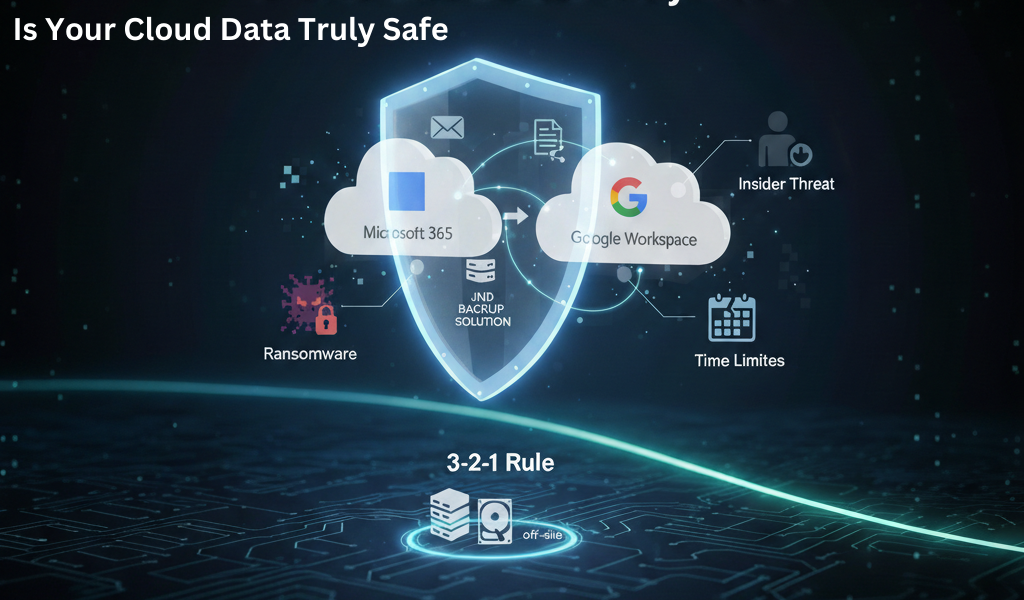
  • Time Limits: Deleted items are often purged permanently after 30 to 93 days.
  • No Version Control: If a file is saved with errors or corrupted, the Recycle Bin only holds the deleted version, not a history of clean versions you can revert to.
 
3. Protection Against Ransomware and “Sync Errors”
Ransomware is designed to spread. Because cloud drives (like OneDrive or Google Drive) sync instantly, if a local computer is hit by ransomware, the encrypted, unusable files are immediately synced to the cloud, overwriting your healthy data.
A third-party backup solution provides immutable copies of your data stored in a completely separate environment, allowing you to “roll back the clock” to a point before the attack occurred.
 
4. Guarding Against Malicious Insiders
It’s a difficult reality to face, but data loss often comes from within. A disgruntled employee with the right permissions can systematically delete files and empty the trash, leaving no trace for the cloud provider to recover. Independent backups ensure that even if an account is compromised or an employee goes rogue, your business’s “digital paper trail” remains intact.
 
5. Compliance and “The 3-2-1 Rule”
For many industries—especially the insurance and financial sectors we serve at JND—strict compliance laws require data to be retained for years. Standard cloud subscriptions often fall short of these legal requirements.
 
Following the 3-2-1 Backup Rule (3 copies of data, on 2 different media types, with 1 copy off-site) is the gold standard for security. Storing your backup in the same cloud as your live data means you have a single point of failure.


Secure Your Future with JND Consulting Group

Don’t wait for a data loss event to realize the limitations of your current setup. At JND Consulting Group, we specialize in Advanced Backup and Disaster Recovery solutions that fill the gaps left by big-box cloud providers.
 
Whether you need Cloud-to-Cloud backupSite Replication, or Cybersecurity Hardening, we provide the “winning gameplan” to keep your business running in any storm.
 
Is your cloud data fully protected? Contact us today for a comprehensive security assessment and let’s make sure your business stays agile, flexible, and secure.

Leave a Reply

OFFICES

JND Consulting Group
Office:
BOCA RATON

PALM BEACH GARDENS

FORT LAUDERDALE

ATLANTA

1.888.288.3007

Get a Free, Instant Quote!

One of our IT Specialists will reach out to you shortly.